Biometric SDK
An open-source library that recognizes people by their iris or their face, and runs on Android, iOS and the JVM from one Kotlin code base. You give it an eye image or a selfie; it gives you a compact template and a yes-or-no answer to "is this the same person?". Nothing leaves the device or your server: there is no cloud call anywhere in the code.
Iriscan uses the same code in its own products, and the face match of this SDK is the one that runs inside Inji Wallet, the reference wallet of MOSIP, the open-source national ID platform.
What it does
- Turns a near-infrared photo of an eye into an iris template and compares two templates. The whole iris pipeline is plain Kotlin, so it behaves the same on every platform and needs no native libraries.
- Finds a face in a photo, turns it into an embedding with a FaceNet-type model and compares embeddings. Uses ML Kit on Android, Apple Vision on iOS and OpenCV on the JVM to find the face, and TensorFlow Lite to run the model.
- Checks that a face is live, not a printed photo or a screen, with a liveness model, and tells which way the head is turned.
- Reads and writes PNG and BMP images and converts to and from Bitmap, UIImage and BufferedImage.
- Serializes templates as ISO/IEC 19794-6 (iris image) and ISO/IEC 19794-2 (finger minutiae) records, the formats other biometric systems understand.
Quick start
Add the dependency. Replace 0.7.0 with the latest version shown in the badges.
// Android
implementation("net.iriscan:biometric-sdk-android:0.7.0")

// JVM
implementation("net.iriscan:biometric-sdk-jvm:0.7.0")
# iOS, Podfile
pod 'BiometricSdk', '~> 0.7.0'
Configure once, then compare two eye images:
import net.iriscan.sdk.BiometricSdkFactory
import net.iriscan.sdk.iris.*

val config = BiometricSdkFactory.configBuilder()
    .withContext(applicationContext)                 // Android only
    .withIris(
        extractor = IrisExtractProperties(),
        encoder = IrisEncodeProperties(),
        matcher = IrisMatchProperties(threshold = 0.67),
    )
    .build()
BiometricSdkFactory.initialize(config)
val sdk = BiometricSdkFactory.getInstance()!!

val eye1 = sdk.io().readImage(bytesOfFirstPhoto)
val eye2 = sdk.io().readImage(bytesOfSecondPhoto)

val template1 = sdk.iris().encoder().extractAndEncode(eye1)   // ByteArray, a few kilobytes
val template2 = sdk.iris().encoder().extractAndEncode(eye2)

val samePerson = sdk.iris().matcher().matches(template1, template2)
Store template1 instead of the photo: it is what you compare against next time, and the photo cannot be rebuilt from it.
Face comparison works the same way, with the model file supplied by you:
import net.iriscan.sdk.face.*

val config = BiometricSdkFactory.configBuilder()
    .withContext(applicationContext)
    .withFace(
        extractor = FaceExtractProperties(),
        encoder = FaceEncodeProperties(
            FaceNetModelConfiguration(
                path = "https://example.com/models/facenet.tflite",  // URL or local file
                inputWidth = 160, inputHeight = 160, outputLength = 128,
                modelChecksum = null, modelChecksumMethod = null, overrideCacheOnWrongChecksum = null,
            )
        ),
        matcher = FaceMatchProperties(threshold = 1.0),
        liveness = null,
    )
    .build()
BiometricSdkFactory.initialize(config)
val sdk = BiometricSdkFactory.getInstance()!!

val face1 = sdk.face().encoder().extractAndEncode(nativeImage1)   // Bitmap, UIImage or BufferedImage
val face2 = sdk.face().encoder().extractAndEncode(nativeImage2)
val samePerson = face1 != null && face2 != null && sdk.face().matcher().matches(face1, face2)
Models are downloaded once and cached on the device. Working example apps: Android, iOS and React Native.
How it works
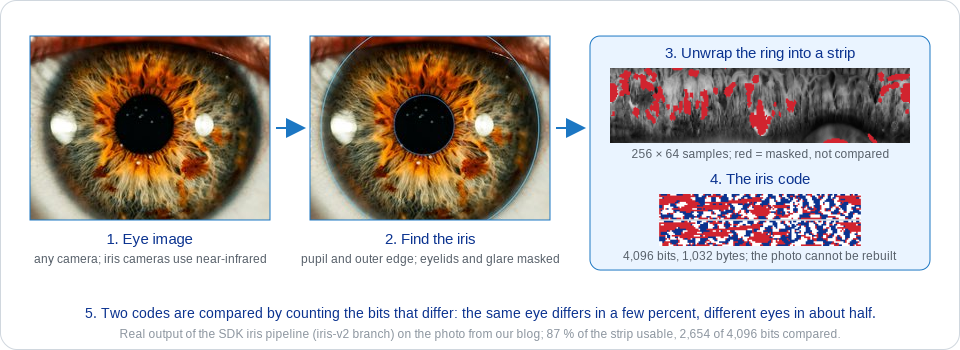
Iris. The iris is the colored ring around the pupil. Its texture is formed before birth, does not change with age and differs even between identical twins and between a person's two eyes, which is why it is the most accurate biometric in everyday use. The SDK finds the pupil and the outer edge of the iris in the image, masks out eyelids and reflections, unwraps the ring into a rectangular strip and turns the texture of the strip into a string of bits, the iris code (with log-Gabor filters, the classic iris-code method; releases up to 0.6.0 compared neighboring pixels into local binary patterns). Two codes are compared by counting the bits that differ, ignoring masked areas; the SDK reports a similarity between 0 and 1 and calls it a match above the threshold you configured. Iris cameras use near-infrared light, which makes the texture visible even in dark eyes, so the algorithm expects NIR images.
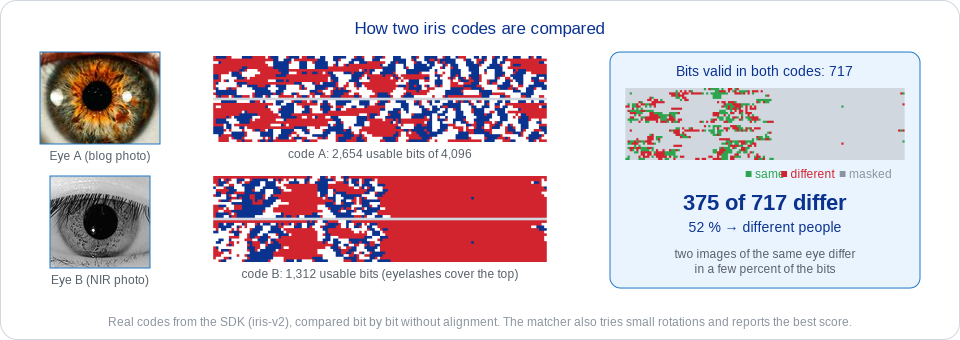
The pictures above are real output of the iris pipeline on the iris photo from our blog and on a near-infrared eye photo by Boodlemason (Wikimedia Commons, CC BY-SA 3.0); the figure files are under the same license.

Face. The platform's face detector finds the largest face and its eyes, the SDK crops and aligns it, and a FaceNet-type neural network turns the crop into a list of numbers called an embedding. Faces of the same person give embeddings that are close together; the matcher measures the distance and compares it with the threshold. The network is a TensorFlow Lite file that you choose and host, so you can replace it with a better one without touching the SDK. The liveness check runs a second model on the face crop and returns a score; the position check uses the detector's head angles.
Templates, not photos. A template is small, cannot be turned back into the image, and is what you keep in your database. The ISO/IEC 19794 serializers let you exchange records with other vendors' software instead of being locked in.
Every configuration parameter, the iris pipeline step by step and the per-platform notes are in the sections below; integration guides for the cloud and the edge service are on docs.iriscan.com.
Status of the modules
This README describes version 0.7.0, which replaces the iris algorithm. Releases up
to 0.6.0 contain the previous iris encoder, whose templates are not compatible with
the new ones (see Matching for how old templates are handled).
| Area | API | Android | iOS | JVM | Notes |
|---|---|---|---|---|---|
| Iris extraction, encoding, matching | iris() |
yes | yes | yes | Common Kotlin, no native dependencies |
| Iris quality assessment | iris().quality() |
yes | yes | yes | Components of ISO/IEC 29794-6, not certified |
| Face extraction | face().extractor() |
ML Kit | Vision | OpenCV Haar cascades | |
| Face encoding and matching | face().encoder(), face().matcher() |
TFLite | TFLite | TFLite | You supply the FaceNet-type model |
| Photo liveness | face().livenessPhoto() |
TFLite | TFLite | TFLite | You supply the model (DeePixBiS-type) |
| Position liveness | face().livenessPosition() |
ML Kit angles | Vision angles | always returns 0 | |
| Image I/O | io() |
yes | yes | yes | PNG and BMP in common code |
| ISO/IEC 19794-6 and 19794-2 records | serializer classes | yes | yes | yes | Not registered in io().readRecord() |
| Fingerprint extraction and matching | none | no | no | no | Only the record format exists |
| Generic quality control | qualityControl() |
no | no | no | Throws NotImplementedError |
Architecture
Modules and packages
The project is a single Gradle module with the source sets commonMain,
androidMain, iosMain and jvmMain. All packages live under net.iriscan.sdk.
| Package | Contents |
|---|---|
net.iriscan.sdk |
BiometricSdkFactory (entry point), BiometricSdkConfig and its builder, IrisConfig, FaceConfig, BiometricSdkOperations |
core.image |
Image (width, height, color type, IntArray of pixels), ImageColorType (RGB, GRAY, BINARY), color helpers, Point, Circle, and the platform type NativeImage |
core.io |
Platform byte type DataBytes, HashMethod (CRC32, SHA256), and internal pure-Kotlin MemoryStream, CRC-32, Adler-32, SHA-256 and zlib/DEFLATE |
core.record |
BiometricRecord interface and BiometricType |
io |
InputOutputOperations (image codecs, native image conversion, record I/O), ResourceIO and ResourceIOFactory (model files and cache), ImageSerializer and BiometricRecordSerializer interfaces, BMP and PNG serializers |
iris |
Public iris API (IrisOperations, IrisExtractor, IrisEncoder, IrisMatcher, IrisQualityAssessor, property classes) and iris.impl with the algorithm |
iris.record.iso |
IsoRecord19794_6 model and IsoRecord19794_6Serializer |
face |
Public face API (FaceOperations, FaceExtractor, FaceEncoder, FaceMatcher, FaceLivenessPhotoDetection, FaceLivenessPositionDetection, property classes); face.impl holds the common alignment and matching code and the expect declarations of the platform parts |
finger.record.iso |
IsoRecord19794_2 model and IsoRecord19794_2Serializer |
qc |
QualityControlOperations interface (not implemented) |
tf |
Interpreter interface; each platform has its own TensorFlow Lite InterpreterImpl |
exception |
SdkException, SdkInitializationException, SdkNotInitializedException; io.exception holds IOException and UnknownFormatException |
flowchart TD
    APP["Application"]
    subgraph common["commonMain: shared Kotlin"]
        FACTORY["BiometricSdkFactory<br/>configBuilder / initialize / getInstance"]
        OPS["BiometricSdkOperations"]
        IO["io()<br/>image codecs, conversion, records"]
        IRIS["iris()<br/>segmentation, encoding, matching, quality"]
        FACE["face()<br/>operations, alignment, matcher"]
        RES["ResourceIO<br/>model loading and cache"]
        CORE["core<br/>Image, MemoryStream, ZLib, CRC-32, SHA-256"]
        ISO["iris.record.iso, finger.record.iso<br/>ISO/IEC 19794-6 and 19794-2"]
    end
    subgraph android["androidMain"]
        ANDR["Bitmap, ByteArray, Context<br/>ML Kit face detection<br/>TensorFlow Lite 2.12<br/>Ktor OkHttp"]
    end
    subgraph ios["iosMain"]
        IOSN["CGImageRef wrapper, NSData<br/>Vision framework<br/>TensorFlowLiteObjC 2.12<br/>Ktor Darwin"]
    end
    subgraph jvm["jvmMain"]
        JVMN["BufferedImage, ByteArray<br/>OpenCV 4.6 Haar cascades<br/>TensorFlow Lite 2.10 via JavaCPP<br/>Ktor OkHttp"]
    end
    APP --> FACTORY --> OPS
    OPS --> IO
    OPS --> IRIS
    OPS --> FACE
    IRIS --> CORE
    IO --> CORE
    APP -.->|"used directly"| ISO
    FACE --> RES
    FACE -.->|"expect / actual"| ANDR
    FACE -.->|"expect / actual"| IOSN
    FACE -.->|"expect / actual"| JVMN
    RES -.->|"expect / actual"| ANDR
    RES -.->|"expect / actual"| IOSN
    RES -.->|"expect / actual"| JVMN
How platform code is split
Everything that can be expressed in plain Kotlin is in commonMain: the whole iris
pipeline, iris quality, face crop alignment, the face matcher, PNG/BMP codecs,
checksums, zlib and the ISO record serializers. The platform source sets only provide
the pieces listed below, declared with expect in common code (the build enables
-Xexpect-actual-classes).
expect declaration |
Android | iOS | JVM |
|---|---|---|---|
PlatformContext |
typealias to android.content.Context (required) |
empty abstract class (optional) | empty abstract class (optional) |
NativeImage |
typealias to android.graphics.Bitmap |
class wrapping a CGImageRef (NativeImage(cgImage)) |
typealias to java.awt.image.BufferedImage |
DataBytes |
ByteArray |
NSData |
ByteArray |
InputOutputImageConvertOperations |
convert(Bitmap), convertToBitmap(Image) |
convert(CGImageRef), convertToCGImage(Image), nsDataToByteArray, byteArrayToNsData |
convert(BufferedImage), convertToBufferedImage(Image) |
| Native image read/write | BitmapFactory / Bitmap.compress |
ImageIO (CGImageSource) / raw pixel buffer |
javax.imageio.ImageIO |
createResourceIO |
assets, classpath, app files, HTTPS; cache in Context.cacheDir |
app bundle, files, HTTPS; cache in NSCachesDirectory |
classpath, files, HTTPS; cache in ${java.io.tmpdir}/.biometric-sdk/ |
FaceExtractorInternal |
ML Kit face detection | Vision VNDetectFaceLandmarksRequest |
OpenCV Haar cascades |
FaceEncoderInternal, FaceLivenessPhotoDetectionInternal |
TFLite Interpreter + TFLite Support image ops |
TFLInterpreter (XNNPACK on) + Core Graphics |
JavaCPP TFLite + Java2D |
FaceLivenessPositionDetectionInternal |
ML Kit head Euler angles | Vision yaw and pitch | not implemented, returns 0 |
The library logs through Napier.
BiometricSdkFactory installs a DebugAntilog when it is first touched, and a short
trace id is attached to the log lines of one face operation when debug logging is on.
Installation
Coordinates
| Platform | Artifact | Notes |
|---|---|---|
| Kotlin Multiplatform | net.iriscan:biometric-sdk:<version> |
Gradle metadata selects the Android or JVM variant |
| Android | net.iriscan:biometric-sdk-android:<version> |
AAR, minSdk 23, compiled against SDK 35; a -debug variant is also published |
| JVM | net.iriscan:biometric-sdk-jvm:<version> |
Java 11 bytecode or newer |
| iOS | CocoaPods pod BiometricSdk |
Static framework, deployment target iOS 13.0 |
Replace <version> with the release you use; the badges at the top show the latest
published versions.
Android
// build.gradle.kts of the app module
dependencies {
    implementation("net.iriscan:biometric-sdk-android:0.7.0")
}
The library manifest declares no permissions. If you load models over HTTPS, add
<uses-permission android:name="android.permission.INTERNET"/> to your app manifest.
The AAR brings in TensorFlow Lite 2.12.0, TensorFlow Lite Support 0.4.3 and ML Kit
face detection 16.1.5 as dependencies.
JVM
dependencies {
    implementation("net.iriscan:biometric-sdk-jvm:0.7.0")
}
<dependency>
    <groupId>net.iriscan</groupId>
    <artifactId>biometric-sdk-jvm</artifactId>
    <version>0.7.0</version>
</dependency>
The JVM artifact depends on the JavaCPP builds org.bytedeco:opencv-platform 4.6.0 and
org.bytedeco:tensorflow-lite-platform 2.10.0. The -platform artifacts include native
libraries for all supported operating systems, which makes the dependency set large;
exclude the platforms you do not deploy to if size matters. Iris recognition itself
does not use these native libraries.
iOS (CocoaPods)
platform :ios, '13.0'

target 'YourApp' do
  pod 'BiometricSdk', '~> 0.7.0'
end
The pod is a static framework named BiometricSdk and depends on the
TensorFlowLiteObjC pod, version 2.12.0. The podspec and the prebuilt XCFramework are
published from the
biometric-sdk-cocoapods-release
repository, tagged with the SDK version.
Kotlin Multiplatform projects
kotlin {
    sourceSets {
        androidMain.dependencies { implementation("net.iriscan:biometric-sdk:0.7.0") }
        jvmMain.dependencies { implementation("net.iriscan:biometric-sdk:0.7.0") }
    }
}
The release workflow publishes the Maven artifacts from a Linux runner and distributes iOS as the CocoaPods framework, so iOS apps should use the pod.
Initialization and configuration
The SDK is a process-wide singleton:
BiometricSdkFactory.configBuilder()returns aBiometricSdkConfigBuilder.withContext(...),withIris(...)andwithFace(...)select what to initialize;build()returns aBiometricSdkConfig.BiometricSdkFactory.initialize(config)creates the operations. Only the first call has an effect: later calls return without changing the configuration.BiometricSdkFactory.getInstance()returnsBiometricSdkOperations, ornull(and logs an error) before initialization.
BiometricSdkOperations exposes io(), iris(), face() and qualityControl().
iris() and face() throw IllegalStateException when the modality was not configured,
and each face sub-operation throws the same exception when its own properties were not
given. io() is always available.
initialize creates the TensorFlow Lite interpreters of the configured face
operations immediately, which loads (and, for https: paths, downloads) the model
files. Downloads run synchronously on the calling thread, so on Android call
initialize off the main thread when models come from the network.
Kotlin (Android)
import net.iriscan.sdk.BiometricSdkFactory
import net.iriscan.sdk.iris.IrisEncodeProperties
import net.iriscan.sdk.iris.IrisExtractProperties
import net.iriscan.sdk.iris.IrisMatchProperties
import net.iriscan.sdk.iris.IrisQualityProperties

val config = BiometricSdkFactory.configBuilder()
    .withContext(applicationContext)          // required on Android
    .withIris(
        extractor = IrisExtractProperties(),
        encoder = IrisEncodeProperties(),
        matcher = IrisMatchProperties(threshold = 0.67),
        quality = IrisQualityProperties(),     // optional, defaults shown
    )
    .build()

BiometricSdkFactory.initialize(config)
val sdk = BiometricSdkFactory.getInstance()!!

val eye = sdk.io().convert(bitmap)                       // Bitmap -> Image
val template: ByteArray? = sdk.iris().encoder().extractAndEncode(eye)
On the JVM and iOS the context can be omitted; a default one is created. On Android
initialize throws SdkInitializationException without a context.
Kotlin with face and liveness
import net.iriscan.sdk.core.io.HashMethod
import net.iriscan.sdk.face.*

val config = BiometricSdkFactory.configBuilder()
    .withContext(applicationContext)
    .withFace(
        extractor = FaceExtractProperties(),
        encoder = FaceEncodeProperties(
            FaceNetModelConfiguration(
                path = "https://models.example.com/facenet.tflite", // your model
                inputWidth = 160,                                   // must match the model
                inputHeight = 160,
                outputLength = 128,                                 // embedding length
                modelChecksum = "<sha-256 of the file, lowercase hex>",
                modelChecksumMethod = HashMethod.SHA256,
                overrideCacheOnWrongChecksum = true,
            )
        ),
        matcher = FaceMatchProperties(threshold = 1.0),  // distance, calibrate it
        liveness = FaceLivenessDetectionProperties(
            photo = LivenessModelPhotoConfiguration(
                path = "assets:liveness.tflite",
                inputWidth = 224,
                inputHeight = 224,
                threshold = 0.5,
            ),
            position = LivenessModelPositionConfiguration(threshold = 15.0), // degrees
        ),
    )
    .build()
The model URLs, sizes and thresholds above are placeholders. The SDK does not ship face or liveness models; input size and output length must match the model you use.
Java (JVM)
import java.io.File;
import javax.imageio.ImageIO;
import net.iriscan.sdk.*;
import net.iriscan.sdk.core.image.Image;
import net.iriscan.sdk.iris.*;

BiometricSdkConfig config = BiometricSdkFactory.INSTANCE.configBuilder()
        .withIris(new IrisExtractProperties(), new IrisEncodeProperties(), new IrisMatchProperties())
        .build();
BiometricSdkFactory.INSTANCE.initialize(config);
BiometricSdkOperations sdk = BiometricSdkFactory.INSTANCE.getInstance();

Image eye = sdk.io().convert(ImageIO.read(new File("eye.png")));
byte[] template = sdk.iris().encoder().extractAndEncode(eye);   // null on failure
IrisQuality quality = sdk.iris().quality().assess(eye);         // null on failure
Swift (iOS)
Kotlin objects are reached through .shared in Swift, DataBytes is NSData
(Data in Swift), and NativeImage wraps a CGImage.
import BiometricSdk

let builder = BiometricSdkFactory.shared.configBuilder()
let config = builder.withFace(
    extractor: FaceExtractProperties(),
    encoder: FaceEncodeProperties(tfModel: FaceNetModelConfiguration(
        path: "bundle:facenet.tflite", inputWidth: 160, inputHeight: 160, outputLength: 128)),
    matcher: FaceMatchProperties(threshold: 1.0),
    liveness: FaceLivenessDetectionProperties(
        photo: LivenessModelPhotoConfiguration(
            path: "bundle:liveness.tflite", inputWidth: 224, inputHeight: 224, threshold: 0.5),
        position: LivenessModelPositionConfiguration(threshold: 15.0))
).build()

try BiometricSdkFactory.shared.initialize(config: config)

guard let sdk = BiometricSdkFactory.shared.getInstance(),
      let cgImage = uiImage.cgImage else { return }
let image = NativeImage(cgImage: cgImage)

let template = sdk.face().encoder().extractAndEncode(nativeImage: image)     // Data?
let distance = sdk.face().matcher().matchScore(sample1: t1, sample2: t2)     // Double
let live = sdk.face().livenessPhoto().extractAndValidate(nativeImage: image) // KotlinBoolean?
let position = sdk.face().livenessPosition().detectPosition(nativeImage: image)

// Iris works on the SDK Image type
let eye = sdk.io().convert(image: cgImage)
let quality = sdk.iris().quality().assess(sample: eye)
let score = sdk.iris().matcher().score(sample1: irisTemplate1, sample2: irisTemplate2)
let best = sdk.iris().matcher().identify(sample: probe, samples: gallery)     // IrisMatch?
Points specific to Swift:
- Kotlin default argument values are not exported to Objective-C and Swift. Every
argument of
withFace,withIrisand of the property constructors has to be passed. This is easy for the face classes but verbose for the iris property classes (for exampleIrisExtractPropertiestakes a Kotlin array ofClosedRangevalues). - Kotlin methods that are overloaded on the parameter type, such as
IrisEncoder.extractAndEncode(sample:)forImageandBiometricRecord, get disambiguated names in the generated Objective-C header. CheckBiometricSdk.hin the framework for the exact Swift names. - Kotlin exceptions are only translated into Swift errors for functions annotated with
@Throws, which here isinitialize. Callingiris()orface()on an SDK that was not configured for that modality terminates the app.
Iris recognition
API
| Call | Returns | Description |
|---|---|---|
iris().extractor().extract(image) |
Image? |
Unwrapped iris texture, normalizedWidth x normalizedHeight, GRAY, occluded pixels set to -1; null when segmentation fails |
iris().encoder().extractAndEncode(image) |
DataBytes? |
Segment, normalize and encode in one step; null when segmentation fails or less than 20% of the texture is usable |
iris().encoder().encode(texture) |
DataBytes |
Encode a texture produced by extract (or any grayscale texture, resampled to the configured size) |
iris().matcher().score(t1, t2) |
Double |
Similarity 0.0 to 1.0 (1 - HD) |
iris().matcher().matches(t1, t2) |
Boolean |
score >= threshold |
iris().matcher().identify(probe, gallery) |
IrisMatch? |
Best candidate (index, score) if it reaches the threshold, otherwise null |
iris().matcher().matchesAny(probe, gallery) |
Boolean |
identify(...) != null |
iris().quality().assess(image) |
IrisQuality? |
Quality metrics, combined score and failed checks; null when no iris is found |
The overloads that take a BiometricRecord (extract, encode, extractAndEncode,
matches, matchesAny) are declared but not implemented and throw
NotImplementedError.
The input is an Image of any color type: RGB is converted with ITU-R BT.601 luma,
BINARY maps to 0 and 255. The input is never modified. The algorithm is tuned for
near-infrared eye images as produced by iris cameras; the eyelid detector, for example,
assumes that eyelid skin is brighter than the iris.
The iris code keeps no shared mutable state, so the iris operations can be called from several threads.
Pipeline
flowchart TD
    IN["Eye image"] --> GRAY["Grayscale, BT.601 luma"]
    GRAY --> SMALL["Working copy: area-average downscale<br/>shorter side about workingSize = 240 px"]
    SMALL --> REFL["Reflection mask: saturated pixels and compact bright spots<br/>dilated, then inpainted from darker neighbours"]
    REFL --> BLOBS["Pupil candidates: up to 8 dark blobs<br/>centroid and equivalent radius"]
    BLOBS --> PUPIL["Pupil circle: integro-differential operator<br/>64 directions in 8 sectors, 0.375 sector quantile<br/>coarse search, refinement, glint-ring check"]
    PUPIL --> LIMBUS["Limbus circle, two stages<br/>lateral sectors only, wide radial derivative<br/>innermost strong edge, then centre and radius refined"]
    LIMBUS --> LIDS{"detectEyelids"}
    LIDS -->|"true"| LIDFIT["Upper and lower eyelids<br/>3 vertical bands, parabola or line"]
    LIDS -->|"false"| UNWRAP
    LIDFIT --> UNWRAP["Rubber-sheet unwrap at full resolution<br/>256 x 64 texture"]
    UNWRAP --> MASK["Mask: outside image, reflections, eyelids,<br/>intensity outliers beyond 3 robust sigma"]
    MASK --> ENOUGH{"usable texture at least 20%"}
    ENOUGH -->|"no"| FAIL["null: failure to enroll"]
    ENOUGH -->|"yes"| BANDS["16 radial bands, mean removed"]
    BANDS --> GABOR["1D log-Gabor filter per band via FFT<br/>wavelength 18 px, sigmaOnF 0.5"]
    GABOR --> BITS["2 phase bits at 128 angular positions<br/>validity mask, 15% weakest responses masked"]
    BITS --> TEMPLATE["IR2 template<br/>4096-bit code + 4096-bit mask = 1,032 bytes"]
    TEMPLATE --> MATCH["Masked fractional Hamming distance<br/>circular shifts of plus or minus 8 columns<br/>normalized for compared bits"]
    MATCH --> SCORE["score = 1 - HD, compared with threshold 0.67"]
    MASK --> QUALITY["Quality assessment<br/>ISO/IEC 29794-6 components"]
1. Preparation and reflection removal
Segmentation runs on a copy downscaled by area averaging so that the shorter side is
about workingSize pixels (240 by default; images are never upscaled). Specular
reflections create strong false edges, so they are removed first. A pixel is a
reflection if it is saturated (at least the larger of 230 and the 99.5th percentile of
the image) or if it belongs to a compact bright spot: brighter than 170 and more than
40 grey levels above a Gaussian-smoothed background, in a connected component whose
bounding box is smaller than max(6, shortSide / 20) pixels. The size limit keeps
bright sclera along the limbus and bright iris texture out of the mask. The mask is
dilated by 3 pixels and the masked pixels are filled layer by layer from the 25th
percentile of their unmasked 7 x 7 neighbourhood, so the halo of a glint does not
spread into the fill. The result is smoothed with a Gaussian (sigma 1.2) for the
boundary searches.
2. Pupil
Candidate pupils come from dark regions: starting from the darkest pixels below the
image median, regions are grown while pixels stay within
max(12, 0.3 * (median - seed)) of the seed value. Regions of plausible size give up
to 8 candidates, each represented by its centroid and equivalent radius, which places
the search near the true centre even when the darkest pixel is off-centre.
Around each candidate the boundary is searched with Daugman's integro-differential
operator: for each centre and radius, the mean intensity on the circle is sampled in
64 directions grouped into 8 angular sectors, the radial derivative is computed per
sector and smoothed with a [1 2 1] kernel, and the sectors are combined by the 0.375
quantile instead of the mean. A boundary therefore has to be present in about five of
the eight sectors, which rejects circles that only touch a strong partial edge such as
an eyelid or a cluster of eyelashes. Candidates are ranked by edge strength multiplied
by the darkness of the disc inside. The best circle is refined on a half-pixel grid.
Illuminators often leave a ring of glints inside the pupil, which produces a circular edge smaller than the pupil. The SDK therefore looks for a larger concentric edge; if the ring between the two circles is as dark as the pupil, the larger circle is taken.
Pupil radius limits default to 3% to 22% of the shorter image side and can be set in
pixels with minPupilRadius and maxPupilRadius.
3. Limbus (iris boundary)
The iris boundary is searched as a separate circle, so pupil and iris centres may
differ. Only the angular sectors in irisAnglesToSearch are used (by default
-40 to 40 degrees and 140 to 220 degrees, with 0 pointing right and 90 down), because
eyelids rarely cover the left and right sides of the iris. The search radius is limited
by minIrisRadius and maxIrisRadius (12% to 60% of the shorter side by default) and by
the allowed pupil-to-iris ratio (minPupilIrisRatio 0.15, maxPupilIrisRatio 0.75).
The search has two stages, because searching all centres at once lets eyelid and eye corner edges win:
- Centres within 2 pixels of the pupil centre are tried with a radial derivative taken over a wider scale, which measures the total step of the blurred limbus rather than iris texture. The four lateral sectors are combined by the 0.34 quantile, so both sides of the eye must show the edge, and at least 75% of the sectors must lie inside the image. The innermost local maximum that reaches 90% of the strongest edge is taken, since eyelids and eye corners lie further out. If nothing is found, the search is repeated with the 0.67 quantile, which accepts an edge visible in two of the four sectors.
- Centre and radius are refined around that result: up to 12% of the radius horizontally but only 4% vertically, since lateral arcs fix the horizontal position well and the vertical one only weakly, and within 10% of the radius.
A pair is rejected when the pupil circle is not inside the iris circle.
4. Eyelids
When detectEyelids is true, upper and lower eyelids are located separately. The
central 1.5 iris radii of the iris width are split into three vertical bands. In each
band, mean intensities of the iris rows (between pupil and limbus) are compared above
and below every row, and the eyelid is the row with the strongest step from bright
skin to darker iris. A step is accepted only if it is at least
max(15, 0.2 * iris intensity) grey levels and the skin side is brighter than the
typical iris intensity, measured as the median of the lateral iris sectors, by at least
max(15, 1.5 * robust sigma). Three points define a parabola, which must be convex
towards the pupil; otherwise the most occluding point gives a horizontal line. The
upper eyelid is searched down to the pupil centre, since it can cover part of the
pupil.
5. Normalization
The iris is unwrapped with Daugman's rubber-sheet model to a normalizedWidth x
normalizedHeight texture (256 x 64 by default) by bilinear sampling of the
full-resolution grayscale image. Each column is an angle, starting at 0 degrees (to
the right in image coordinates); each row interpolates linearly between the point on
the pupil circle and the point on the limbus circle at that angle, which handles
non-concentric circles and pupil dilation. The radial coordinate runs from 4% to 96%
of the way out, to stay clear of the blurred boundaries.
A sample is marked invalid when it lies outside the image, on a reflection (mask
recomputed at full resolution), above the upper eyelid or below the lower eyelid.
Finally, samples further than outlierSigma (3.0) robust standard deviations from the
median intensity of the lateral sectors are masked, which removes eyelashes (darker)
and residual skin or glints (brighter). The lateral statistics keep a large occluded
area from shifting the reference. If less than 20% of the texture remains valid,
extraction returns null.
extractor().extract(image) returns this texture as a GRAY image in which invalid
pixels are -1.
6. Encoding
The texture is averaged into templateRows radial bands (16 by default, 4 texture rows
each). A column of a band is valid if at least half of its rows are valid; a band with
fewer than a quarter valid columns stays fully masked. Each band is a periodic signal
around the eye. Its mean is removed and it is filtered in the frequency domain (radix-2
FFT, so the texture width must be a power of two) with a one-sided 1D log-Gabor filter:
G(f) = exp( -ln(f / f0)^2 / (2 * ln(sigmaOnF)^2) ), f0 = 1 / wavelength, G = 0 for f <= 0
With the defaults wavelength = 18 texture pixels and sigmaOnF = 0.5. Because the
filter has no DC response, the code does not depend on image brightness or contrast.
Keeping only positive frequencies yields a complex response whose phase is quantized
to two bits, the signs of the real and imaginary parts, at templateCols angular
positions (128 by default, every second texture column).
The mask bit of a cell is set only if the centre column is valid and at least three
quarters of the filter window (half a wavelength on each side) saw valid iris. Fragile
bits, the responses closest to zero, flip easily between captures; the weakest
fragileBitFraction (15%) of the real and of the imaginary responses among valid
cells are masked as well.
7. Template format (IR2)
| Offset | Size | Content |
|---|---|---|
| 0 | 3 | ASCII IR2 |
| 3 | 1 | Version, currently 1 |
| 4 | 1 | Rows (templateRows) |
| 5 | 1 | Columns / 32 |
| 6 | 1 | Bits per cell, always 2 |
| 7 | 1 | Reserved, 0 |
| 8 | rows x cols x 2 / 8 | Code bit plane |
| ... | rows x cols x 2 / 8 | Mask bit plane |
Bit (r * cols + c) * 2 is the sign of the real part for row r and column c, and
the next bit the sign of the imaginary part. Bits are packed into 64-bit words stored
little-endian; every row occupies whole words, so an eye rotation is a circular shift
of each row. With the defaults a template is 16 x 128 x 2 = 4096 code bits plus 4096
mask bits: 8 + 512 + 512 = 1,032 bytes.
8. Matching
Two templates are compared with the masked fractional Hamming distance. The probe is
shifted circularly by -maxShift to +maxShift columns (8 by default; one column is
360 / 128 = 2.8 degrees, so about plus or minus 22.5 degrees of head tilt are
compensated). For every shift:
n      = popcount(maskA AND maskB)                  bits valid in both templates
HDraw  = popcount((codeA XOR codeB) AND maskA AND maskB) / n
HDnorm = 0.5 - (0.5 - HDraw) * sqrt(n / normalizationBits)
The normalization (Daugman) pulls comparisons that rest on few bits towards 0.5, so a
small overlap cannot produce a confident match. normalizationBits defaults to 40% of
the template bits (1,638 for the default size). Shifts with fewer than
minComparedBitsFraction (15%, 614 bits by default) common bits are ignored. The
smallest HDnorm over all shifts gives the score 1 - HDnorm: 1.0 for identical codes,
about 0.5 for unrelated irises. If no shift has enough common bits, or the templates
have different dimensions, the score is 0.
For 1:N search, identify prepares all rotations of the probe once and scans the
gallery linearly; with the defaults each comparison is 17 shifts over 64 words of code
and mask. It returns the index and score of the best candidate if the score reaches
the threshold.
Templates created by SDK 0.6 and earlier have no IR2 header. Two such templates are
still compared with the old byte-equality method and legacyThreshold (0.7), but a
legacy template never matches an IR2 template (score 0). To move to the new
algorithm, re-enroll from the stored images.
Choosing the threshold
The default threshold 0.67 corresponds to a Hamming distance of 0.33. The right value
depends on your sensors, population, capture conditions and the false match rate you
can accept, especially for large 1:N galleries, where the chance of a false match grows
with the gallery size. Measure score distributions on your own images with the
benchmark and set IrisMatchProperties(threshold = ...).
Configuration reference
All radii are in pixels of the input image. Changing any encoding parameter, or the texture size, produces templates that are not comparable with existing ones.
IrisExtractProperties
| Parameter | Default | Meaning |
|---|---|---|
workingSize |
240 | Shorter side of the downscaled copy used for segmentation (at least 80) |
minPupilRadius, maxPupilRadius |
null (3% and 22% of the shorter side) |
Pupil radius limits |
minIrisRadius, maxIrisRadius |
null (12% and 60% of the shorter side) |
Limbus radius limits |
minPupilIrisRatio, maxPupilIrisRatio |
0.15, 0.75 | Allowed pupil/iris radius ratio |
irisAnglesToSearch |
-40..40, 140..220 degrees |
Sectors used to find the limbus |
normalizedWidth |
256 | Texture width; a power of two, at least 64, and a multiple of templateCols |
normalizedHeight |
64 | Texture height, at least 8 |
detectEyelids |
true |
Detect and mask upper and lower eyelids |
outlierSigma |
3.0 | Mask texture samples further than this many robust standard deviations from the iris median |
IrisEncodeProperties
| Parameter | Default | Meaning |
|---|---|---|
templateRows |
16 | Radial bands (1 to 255) |
templateCols |
128 | Angular positions; a multiple of 32, 32 to 2048 |
wavelength |
18.0 | Log-Gabor centre wavelength in texture pixels (greater than 2) |
sigmaOnF |
0.5 | Log-Gabor bandwidth (0.1 to 0.95) |
fragileBitFraction |
0.15 | Share of weakest responses masked per bit plane (0 to 0.5) |
templateWidth, templateHeight |
32, 4 | Deprecated, ignored by the v2 encoder |
IrisMatchProperties
| Parameter | Default | Meaning |
|---|---|---|
threshold |
0.67 | Similarity threshold, 1 - HD |
maxShift |
8 | Rotation compensation in template columns, each side |
minComparedBitsFraction |
0.15 | Minimum share of bits valid in both templates |
normalizationBits |
null (40% of template bits) |
Reference bit count for score normalization |
legacyThreshold |
0.7 | Threshold for pre-0.7 templates |
Quality assessment
iris().quality().assess(image) segments the eye with the configured extractor
settings and reports the components of ISO/IEC 29794-6. It returns null when no iris
is found. Typical use is to ask for another capture before enrollment:
val q = sdk.iris().quality().assess(eye)
if (q == null || !q.isAcceptable) {
    // retake; q?.issues lists the failed checks
}
Metric (IrisQuality) |
How it is measured | Default threshold (IrisQualityProperties) |
Issue |
|---|---|---|---|
usableIrisArea |
Share of the normalized iris not masked by eyelids, eyelashes, reflections or image borders, 0 to 100 | minUsableIrisArea 70 |
LOW_USABLE_IRIS_AREA |
irisScleraContrast |
100 * (S - I) / (S + I); medians of sclera (1.1 to 1.25 iris radii) and outer iris in the lateral sectors; 0 if the sclera is outside the image |
minIrisScleraContrast 5 |
LOW_IRIS_SCLERA_CONTRAST |
irisPupilContrast |
100 * (I - P) / (I + P); inner iris median and the lower quartile of pupil samples, which suppresses glints |
minIrisPupilContrast 30 |
LOW_IRIS_PUPIL_CONTRAST |
greyScaleUtilisation |
Entropy of the 256-bin image histogram, bits | minGreyScaleUtilisation 6 |
LOW_GREY_SCALE_UTILISATION |
irisRadius |
Limbus radius, pixels | minIrisRadius 75 |
SMALL_IRIS |
pupilIrisRatio |
100 * pupil radius / iris radius |
pupilIrisRatioRange 20 to 70 |
PUPIL_TOO_SMALL_OR_LARGE |
irisPupilConcentricity |
100 * (1 - centre distance / iris radius) |
minIrisPupilConcentricity 90 |
LOW_CONCENTRICITY |
marginAdequacy |
Worst margin between iris and image border, relative to 0.6 iris radius left and right and 0.2 iris radius top and bottom, capped at 100 | minMarginAdequacy 80 |
IRIS_TOO_CLOSE_TO_EDGE |
sharpness |
Daugman's focus measure: power of the response to an 8 x 8 kernel (-1 outside, +3 in the central 4 x 4) over the visible iris, after scaling the image so that the iris radius is at most about 100 px; mapped to 0 to 100 by x^2 / (x^2 + 120^2) |
minSharpness 50 |
OUT_OF_FOCUS |
score (0 to 100) is the usable iris area multiplied by min(1, value / threshold) for
every other metric, so each metric below its threshold reduces it proportionally.
issues lists the failed checks and isAcceptable is true when it is empty.
The formulas follow the components of ISO/IEC 29794-6 but this is not a certified implementation of the standard. Confirm the thresholds on images from your own capture devices.
Face recognition and liveness
API
| Call | Returns | Description |
|---|---|---|
face().extractor().extract(nativeImage) |
NativeImage? |
Face crop, aligned on JVM, null if no usable face |
face().encoder().encode(nativeImage) |
DataBytes |
Embedding of an image that is already a face crop |
face().encoder().extractAndEncode(nativeImage) |
DataBytes? |
Extract with alignment, then encode |
face().matcher().matchScore(t1, t2) |
Double |
Distance between two embeddings; lower is more similar |
face().matcher().matches(t1, t2) |
Boolean |
distance <= threshold |
face().matcher().matchScoreMin(t, list) / matchesAny(t, list) |
Double / Boolean |
Smallest distance to any template in the list |
face().livenessPhoto().score(nativeImage) / validate(...) |
Double / Boolean |
Liveness score of a face crop; valid if score > threshold |
face().livenessPhoto().extractAndScore(...) / extractAndValidate(...) |
Double / Boolean? |
Extract the face first (no alignment); -1.0 or null when no face is found |
face().livenessPosition().detectPosition(nativeImage) |
Int |
0 straight, 1 left, 2 right, 3 top, 4 bottom |
Note that for faces matchScore is a distance, unlike the iris matcher's similarity.
flowchart LR
    IMG["NativeImage"] --> DET["Platform face detector<br/>Android: ML Kit<br/>iOS: Vision<br/>JVM: OpenCV Haar cascades"]
    DET --> CROP["Face crop"]
    CROP --> PRE1["Resize to model input<br/>per-image standardization"]
    PRE1 --> NET["TFLite FaceNet-type model"]
    NET --> EMB["float32 embedding<br/>big-endian bytes"]
    EMB --> DIST["L2-normalized Euclidean distance<br/>match if distance is at most the threshold"]
    CROP --> PRE2["Resize to model input<br/>scale to -1..1, planar CHW"]
    PRE2 --> LIVE["TFLite liveness model"]
    LIVE --> MAP["Mean of 14 x 14 output map<br/>live if the mean exceeds the threshold"]
Face extraction per platform
| Android | iOS | JVM | |
|---|---|---|---|
| Detector | ML Kit face detection, fast mode, all landmarks | Vision VNDetectFaceLandmarksRequest |
OpenCV Haar cascade haarcascade_frontalface_alt on a histogram-equalized grayscale image; minimum face size max(24, shortSide / 8) |
| Face chosen | Largest | First result | Largest |
| Requirements | Box strictly inside the image, both eye landmarks found | Box origin inside the image, both eye landmarks found | None beyond a detection |
| Crop | The detection box | The detection box | Square, 20% margin around the box, resampled to 192 x 192 |
| Alignment | Rotated only if the eye line is tilted by more than 45 degrees | Rotated only if the eye line is tilted by more than 45 degrees | Eyes found with haarcascade_eye in the upper 60% of the face; crop rotated so the eye line is level when the tilt is at most 30 degrees |
On Android the detector is called synchronously (Tasks.await), so face operations
must run off the main thread. The JVM cascades are bundled in the JAR and copied to
${java.io.tmpdir}/.biometric-sdk/ on first use.
Encoding and matching
The encoder resizes the crop to inputWidth x inputHeight (bilinear on Android,
area averaging on the JVM, Core Graphics high-quality interpolation on iOS) and
standardizes it per image: (x - mean) / max(std, 1 / sqrt(N)) over all pixel values,
as FaceNet expects. The model output is outputLength float32 values, returned as
4 * outputLength bytes in big-endian order on all platforms. On iOS, the
encode(Image) path converts the SDK image to grey replicated in three channels; the
NativeImage path uses RGB on all platforms.
The matcher L2-normalizes both embeddings and returns their Euclidean distance: 0 for
identical directions, sqrt(2) for orthogonal ones, 2 for opposite ones. Normalizing
in the matcher keeps distances comparable for models without a final L2 layer.
Templates of different lengths cause an IllegalArgumentException.
Photo liveness
The photo liveness check is written for a DeePixBiS-type model: the face crop is
resized to inputWidth x inputHeight, scaled to [-1, 1] with (x / 255 - 0.5) / 0.5,
converted to planar channel-first layout, and the model's 14 x 14 map of live
probabilities is averaged. validate returns score > threshold. The
extractAndScore and extractAndValidate variants run the platform face extractor
first, without alignment.
Position check
detectPosition classifies head orientation against threshold (degrees) using the
detector's angles: 1 (left) if yaw >= threshold, 2 (right) if yaw <= -threshold,
3 (top) and 4 (bottom) from the second angle, otherwise 0. On Android the second
angle is ML Kit's headEulerAngleZ, which is in-plane rotation; on iOS it is Vision's
pitch, which Vision reports from iOS 15 (earlier versions are treated as 0). The JVM
implementation always returns 0.
Model loading and caching
Face and liveness models are loaded through ResourceIO, which is initialized by
BiometricSdkFactory.initialize. A model path has the form location:path:
| Prefix | Android | iOS | JVM | Example |
|---|---|---|---|---|
assets: |
APK assets | assets:models/facenet.tflite |
||
bundle: |
Main bundle resource (name and extension) | bundle:facenet.tflite |
||
classpath: |
yes | yes | classpath:/models/facenet.tflite |
|
file: |
File in the app's internal files directory (Context.openFileInput) |
Absolute path | Absolute path | file:/opt/models/facenet.tflite |
https: |
yes | yes | yes | https://example.com/facenet.tflite |
Local paths are read on every initialization. https: resources are downloaded with
Ktor and cached under a fixed name per
model type, facenet.tflite or liveness-photo.tflite, in the platform cache
directory (Context.cacheDir, NSCachesDirectory, ${java.io.tmpdir}/.biometric-sdk/).
Once cached, the file is used without contacting the server.
The model configuration classes accept modelChecksum, modelChecksumMethod
(HashMethod.SHA256 or HashMethod.CRC32) and overrideCacheOnWrongChecksum. The
checksum is compared as text: SHA-256 as lowercase hex; CRC-32 as Kotlin's signed
hexadecimal Int.toString(16), kept for compatibility with earlier versions. When all
three are set:
- the downloaded (or locally read) file must match the checksum, otherwise an
IOExceptionis thrown; - with
overrideCacheOnWrongChecksum = true, a cached file with a different checksum is replaced by a fresh download.
Checksums are currently applied only on iOS. On Android and the JVM the interpreter loads the model through a code path that accepts these arguments but does not check them (see Limitations). Because the cache name does not depend on the URL, changing the model URL on Android or the JVM does not replace a cached model; clear the cache file to force a new download.
Images, records and I/O
Image types
Image is the SDK's own raster type, used by the iris pipeline and the common codecs:
Image(width, height, colorType, colors), where colors is an IntArray in row-major
order. RGB pixels are 0xRRGGBB, GRAY pixels 0 to 255 (-1 marks masked pixels in
iris textures), BINARY pixels 0 or 1. NativeImage is the platform image used by the
face module (Bitmap, CGImageRef wrapper, BufferedImage).
io() operations
| Call | Description |
|---|---|
readImage(bytes) |
Decode PNG or BMP in common code (format detected from the signature) into an Image: GRAY for grayscale files, RGB (0xRRGGBB) otherwise |
writeImage(image, ImageFormat.PNG / BMP) |
Encode in common code; JPEG throws UnknownFormatException |
readNativeImage(dataBytes) |
Decode with the platform decoder (any format the platform supports) |
writeNativeImage(nativeImage, format) |
Android: PNG or JPEG (quality 90), BMP not supported. JVM: PNG, JPEG, BMP via ImageIO. iOS: returns the raw 32-bit pixel buffer regardless of format |
convert(...), convertTo...(...) |
Conversion between Image and the platform image, listed in Architecture |
readRecord(bytes), writeRecord(record) |
Record I/O through registered serializers; no serializer is registered yet, so both throw UnknownFormatException |
The common PNG decoder reads non-interlaced 8-bit images of every color type (grayscale,
grayscale with alpha, RGB, RGB with alpha, palette), all five row filters and image data
split across several IDAT chunks, and checks every chunk CRC. Alpha is dropped. It
writes RGB images as RGB and GRAY or BINARY images as grayscale. zlib inflate and
deflate are implemented in Kotlin, so PNG behaves the same everywhere. 16-bit and
interlaced PNGs are rejected with an IOException; for those, and for JPEG or TIFF,
decode with the platform (readNativeImage followed by convert).
The BMP codec reads uncompressed 8-bit (palette), 24-bit and 32-bit bitmaps, bottom-up
or top-down; an 8-bit bitmap with a gray palette becomes a GRAY image. It writes
24-bit bitmaps.
ISO/IEC biometric records
The record serializers are public classes that can be used directly:
val serializer = IsoRecord19794_6Serializer()
if (serializer.canRead(bytes)) {
    val record: IsoRecord19794_6 = serializer.read(bytes)
    val firstImage: ByteArray = record.data.first().image   // e.g. PNG or JPEG 2000 bytes
}
| Class | Standard | Detected by | Content |
|---|---|---|---|
IsoRecord19794_6Serializer |
ISO/IEC 19794-6, iris image data | IIR signature |
General header (format id, version, number of irises, certification flag, eyes represented) and per-image representation headers: capture date, device technology, vendor and type ids, quality blocks, eye label, image type, image format (raw, JPEG 2000, PNG), orientation and compression history, size, bit depth, range, roll angle and uncertainty, iris centre and diameter bounds, image data |
IsoRecord19794_2Serializer |
ISO/IEC 19794-2, finger minutiae | FMR signature |
General header and per-finger representations: capture date, device ids, quality and certification records, finger position, sampling rates, impression type, size, minutiae (type, x, y, angle, quality) and extended data |
The field layout matches the 2011 editions of both standards (16-byte and 15-byte general headers). Capture times are written and read in UTC with millisecond precision. Writing and reading a record gives back the same record, which the tests check field by field; the serializers are not validated against the conformance tests of ISO/IEC 29109.
Accuracy and the benchmark
Running the benchmark
IrisDatasetBenchmark is a JVM test (src/jvmTest) that enrolls every image of a
dataset with the default properties, compares all pairs and prints the results. It is
skipped unless IRIS_DATASET is set.
IRIS_DATASET=/data/CASIA-Iris-Interval IRIS_REPORT=build/iris-report \
  ./gradlew jvmTest --tests '*IrisDatasetBenchmark*'
| Variable | Meaning |
|---|---|
IRIS_DATASET |
Directory searched recursively for bmp, jpg, jpeg, png, tif, tiff files |
IRIS_SUBJECT |
Regex with one group that extracts the identity (one eye of one person) from the path relative to IRIS_DATASET. Default: the parent directory, which fits layouts such as CASIA-Iris-Interval 001/L/S1001L01.jpg |
IRIS_LIMIT |
Maximum number of images |
IRIS_REPORT |
Directory for scores.csv (every comparison: subjects, genuine flag, score, compared bits, shift) and det.csv (FMR and FNMR for thresholds 0.40 to 1.00 in steps of 0.005) |
The report contains, in the terms of ISO/IEC 19795-1:
- Failure to enroll: images that could not be read or segmented, or whose usable texture was below 20%. Time per image is printed as well.
- Genuine and impostor score distributions: mean, standard deviation, minimum and
maximum of
1 - HDfor pairs of the same eye and of different eyes. - EER: the error rate at the threshold where FNMR and FMR are closest (thresholds 0.40 to 1.00, step 0.001), with that threshold.
- FNMR at fixed FMR: for FMR of 1%, 0.1%, 0.01% and 0.001%, as far as the number of impostor pairs allows, with the threshold that achieves it.
- FNMR and FMR at the configured default threshold.
To evaluate other settings, change the property objects at the top of the test.
The unit tests in commonTest also check the pipeline on synthetic near-infrared eyes
(SyntheticIris): segmentation accuracy, eyelid masking, rotation compensation,
invariance to brightness and contrast, template serialization, 1:N identification and
separation of genuine and impostor scores. Synthetic data catches regressions but does
not measure accuracy.
React Native
The React Native wrapper exposes face match and liveness. It uses native modules and does not work in Expo Go; use a development build.
npm install @iriscan/biometric-sdk-react-native
cd ios && pod install
import {
  configure, faceCompare, faceScore,
  livenessScore, livenessValidate, livenessGetDirection,
} from '@iriscan/biometric-sdk-react-native';

await configure({
  withFace: {
    encoder: {
      tfModel: {
        path: 'https://github.com/biometric-technologies/tensorflow-facenet-model-test/raw/master/model.tflite',
        inputWidth: 160, inputHeight: 160, outputLength: 512,
      },
    },
    matcher: { threshold: 1.0 },
    liveness: {
      tfModel: {
        path: 'https://github.com/biometric-technologies/liveness-detection-model/releases/download/v0.2.0/deePix.tflite',
        inputWidth: 224, inputHeight: 224, threshold: 0.5,
      },
    },
  },
});

// images are base64 strings
const same = await faceCompare(selfieBase64, documentPhotoBase64);
const distance = await faceScore(selfieBase64, documentPhotoBase64);
const live = await livenessValidate(selfieBase64);
const direction = await livenessGetDirection(frameBase64); // 'STRAIGHT' | 'LEFT' | 'RIGHT' | 'UP' | 'DOWN'
This is the same API Inji Wallet calls for offline face verification; see MOSIP and Inji.
Where it is used
- Face match in Inji Wallet, listed as compliant on the MOSIP marketplace.
- Iriscan Cloud and the Iriscan iris de-duplication server.
- Apps built with the React Native wrapper.
Related repositories
- biometric-sdk-react-native: the same face match and liveness for React Native apps.
- biometric-sdk-android-example and biometric-sdk-ios-example: minimal apps that enroll and identify.
- biometric-sdk-cocoapods-release: the prebuilt iOS framework behind the pod.
- liveness-detection-model: training code and released liveness models.
- biometric-converter: fingerprint images to ISO and ANSI minutiae templates.
- docs: source of the developer documentation.
Building from source
Requirements:
- JDK 17 to run Gradle (the libraries target Java 11 bytecode)
- Android SDK with platform 35 (
ANDROID_HOMEorsdk.dirinlocal.properties) - For the iOS targets: macOS with Xcode (CI uses Xcode 16.4) and CocoaPods
Toolchain versions in the build: Kotlin 2.2.20, Gradle 8.14.3 (wrapper), Android Gradle Plugin 8.7.3.
./gradlew jvmTest                          # common and JVM tests on the JVM
./gradlew jvmTest compileDebugKotlinAndroid  # what the Linux CI job runs
./gradlew build                            # all targets the host supports, with tests
./gradlew allTests                         # tests on every target the host can run
./gradlew podPublishDebugXCFramework       # iOS XCFramework (macOS)
./gradlew publishToMavenLocal              # install into ~/.m2 for local testing
Main dependencies:
| Source set | Dependencies |
|---|---|
| common | kotlinx-datetime 0.6.2, kotlinx-coroutines 1.10.2, Napier 2.7.1, Ktor client 3.2.3 |
| Android | TensorFlow Lite 2.12.0, TensorFlow Lite Support 0.4.3, ML Kit face detection 16.1.5, Ktor OkHttp |
| iOS | TensorFlowLiteObjC 2.12.0 (CocoaPods), Ktor Darwin |
| JVM | JavaCPP TensorFlow Lite 2.10.0-1.5.8, JavaCPP OpenCV 4.6.0-1.5.8, Ktor OkHttp |
CI and releases
Two GitHub Actions workflows live in .github/workflows:
validate.yml runs on pushes to dev and on pull requests to master and dev:
buildonmacos-15with Xcode 16.4, JDK 17 and CocoaPods:./gradlew clean build podPublishDebugXCFrameworkjvm-androidonubuntu-latestwith JDK 17:./gradlew jvmTest compileDebugKotlinAndroid
release.yml runs on every push to master:
check-versionreads the version with./gradlew -q printVersionand continues only if no git tag with that version exists yet.jvm-androidsigns the artifacts and publishes all Maven publications withpublishAllPublicationsToSonatypeRepository closeAndReleaseSonatypeStagingRepository. Publishing goes to Maven Central through the Central Portal's OSSRH-compatible staging API (ossrh-staging-api.central.sonatype.com); the legacy OSSRH service was shut down in June 2025.cocoapods(macOS, Xcode 16.4) builds the release XCFramework withpodPublishReleaseXCFramework, commits it tobiometric-technologies/biometric-sdk-cocoapods-release, tags it with the version and runspod trunk push BiometricSdk.podspec.git-releasecreates a GitHub release namedv<version>with the JAR and AAR files and the zipped XCFramework.
To release, raise version in build.gradle.kts and merge into master. The workflow
needs these repository secrets: SIGNING_KEY_ID, SIGNING_PASSWORD,
SIGNING_SECRET_KEY_RING (base64-encoded key ring), OSSRH_USERNAME and
OSSRH_PASSWORD (a Central Portal user token), COCOAPODS_GIT_DEPLOY_KEY and
COCOAPODS_TRUNK_TOKEN.
For a local publication, the same values can be put into local.properties
(signing.keyId, signing.password, signing.secretKeyRingFile, ossrhUsername,
ossrhPassword); artifacts are signed only when SIGN_JAR_AND_AAR=true.
Limitations and known gaps
Accuracy and standards
- Thresholds must be calibrated. The iris threshold 0.67 is a starting point checked on one dataset, the quality defaults follow values commonly used with ISO/IEC 29794-6, and face and liveness thresholds depend entirely on the model you supply.
- Nothing in the SDK is a certified implementation of an ISO/IEC standard. Quality metrics follow the components of ISO/IEC 29794-6, and the record serializers follow the layout of ISO/IEC 19794-6 and 19794-2, without conformance testing.
- The iris pipeline is tuned for near-infrared images; visible-light iris images have not been evaluated. There is no iris presentation attack detection.
- 1:N iris identification is an exhaustive linear scan in memory. It has no index, so very large galleries need partitioning or a dedicated service.
Not implemented
qualityControl()and theBiometricRecordoverloads of the iris API throwNotImplementedError.io().readRecord()andio().writeRecord()have no registered serializers.- Fingerprints are limited to the ISO/IEC 19794-2 record format: there is no fingerprint extraction or matching.
- Position liveness is not implemented on the JVM.
Known issues
- Model checksums are not verified on Android and the JVM (the data-loading path of
ResourceIOignores them); only iOS checks them. - On the JVM, the cache directory
${java.io.tmpdir}/.biometric-sdk/is created only when a face extractor loads its cascades. WithextractorleftnullinwithFace, the encoder or liveness model is loaded before any extractor exists, and saving a downloaded model fails if the directory is missing. writeNativeImageon iOS returns raw pixels instead of an encoded file, and on Android does not support BMP.- The common PNG decoder does not read 16-bit or interlaced files.
- The 19794-6 range field (camera to eye distance) is kept only as "unassigned",
"failed" or "measured": a measured distance is read back as
RANGE_OVERFLOW. - Face extraction differs between platforms (choice of face, crop margin, alignment), so embeddings of the same photo are not guaranteed to be identical across platforms.
BiometricSdkFactory.initializecannot reconfigure an initialized SDK, and debug logging is always installed.
For large-scale 1:N de-duplication, see the iris de-duplication service; for other licensing terms, iriscan.com/get-started.
Contributing
Bug reports with steps that reliably reproduce the problem, and feature requests, are welcome as GitHub issues.
For pull requests:
- Open pull requests against
dev.masteris the release branch: every push to it publishes a release when the version has changed. - Keep platform code to what genuinely needs the platform; algorithms belong in
commonMain. - Add or update tests in
commonTest(andjvmTestwhere JVM-only tooling is needed), and make sure./gradlew jvmTest compileDebugKotlinAndroidpasses; the macOS CI job builds the iOS targets. - Changes to the iris algorithm should state their effect on the benchmark (failure to enroll, EER and FNMR at fixed FMR) on a dataset you can name, together with the dataset size.
- Code style is the official Kotlin style (
kotlin.code.style=official).
License
GNU General Public License v3.0, see LICENSE.md. You can use, change and redistribute the SDK freely as long as your software is open source under the same terms. For a closed-source product, Iriscan offers a commercial license.
Contact
Bugs and feature requests: open an issue. Everything else: info@iriscan.com, https://www.iriscan.com.